- Product Updates
- Posts
- [January 2026] 🤘 Why "good enough" beats perfect every time (+ 3 updates)
[January 2026] 🤘 Why "good enough" beats perfect every time (+ 3 updates)
5 tactics to build project momentum, Manual Invites, Reminder Emails, & more

Mica 🔷 Referral Rock
February 04, 2026 • Estimated Reading Time: 4 minutes
Hey it’s Mica,
I’ve always wanted to be “a runner” but could never get past the starting line. I’d research “the right” shoes, make New Year’s resolutions, curate the perfect playlist. Nothing stuck.
A few months ago, I tried something different. I stopped trying to be a perfect runner. Threw on whatever shoes I had, ran a short lap, called it a win. Then I did it the next day.
That’s when it clicked. The less time I spent optimizing upfront, the more I ran.
We learned the same lesson rebuilding our onboarding process and I see the same pattern with our customers. Some teams keep their referral program in draft for weeks, debating small details like whether the reward should be $25 or $30, or this word or that word in their messaging. Meanwhile, others launch a good enough version and start seeing referrals within weeks.
The most expensive thing you can own is a project that hasn't launched yet. Until your idea is out in the world, you're working in a vacuum.
Today, I'm sharing 5 tactics to escape the perfection trap and build momentum for your next project.
Let’s dive in (plus see our normal monthly feature updates at the end),
-Mica
Head of Operations
🏃 Your first version isn't your final version
The fear of launching something imperfect is that you'll be stuck with it. But that's only true if you treat launch as an ending instead of a beginning.
Here are five ways to build momentum:
1) Strip it down to what matters
Start with the smallest version that still delivers real value. You don’t need a perfect system on Day 1. You need three things:
Clear outcome (what this helps someone do)
Simple path (the steps to get there)
A way to reach the right people
Examples:
Referral program: Pick a simple reward (like $50 for both sides), use the default templates, start promoting
Email campaign: One audience segment, one offer, one CTA
New product/service: Build the core thing customers will pay for (not the extras)
2) Set a hard deadline
Without a deadline, "almost ready" stretches forever. Pick a date, work backward from it, and let the date force decisions.
A go live date isn't a prediction that you'll be ready, it's a commitment that creates readiness. When the date is fixed, scope becomes negotiable. When scope is fixed, the date becomes negotiable. You can't have both.
Examples:
Referral program: Block your go live date during onboarding (treat it like an external commitment)
Direct mail promotion: "Spring mailers drop March 1." Commit to the date, then build the campaign around it
Pricing change: Pick the effective date, announce it, then figure out the rollout details
3) Start with a small audience
You don't have to launch to everyone at once. Start with a subset: new customers only, a particular group of people, or a handful of your best advocates.
A small audience reduces the stakes. If something breaks, fewer people see it. If something works, you have proof before you scale.
Examples:
Referral program: Invite new customers as they purchase (not a big blast) or start with 50-100 of your biggest fans
Paid ads campaign: Start with a $200 test budget. A week of real data beats a month of internal debate about creative
New CRM rollout: Onboard one team or one rep. Work out the kinks before rolling out company-wide
4) Document the fast-follow tasks
Before you go live, write down everything you're not including. These aren't failures, they're the list of improvements you'll make once you have real data. This gives you permission to cut scope without forgetting what you plan to improve.
Examples:
Referral program: Keep a running list: "After go-live, we'll add tiered rewards, revisit the landing page copy, setup the advanced integrations"
Email campaign: Add A/B testing, additional creative, re-engagement campaigns once baseline is set
New product/service: Add the nice to haves, the quality of life improvements, and the changes customers actually request
5) Plan your first check-in
Before moving to your next project, schedule a review date on your calendar. Not "when I have time" but pick a specific date.
Leave room for quick fixes, the obvious "oops" moments, that need immediate attention. But resist the urge to optimize before you've gathered enough signal. Let it bake.
Examples:
Referral program: Set a two-week check-in to review your fast-follow list, analyze your referral funnel data, and implement early feedback
Email campaign: Let it run for 30 days then decide what to test next based on engagement
Landing page: Commit to 500 visitors before making changes (collect data first, react second)
How we applied these 5 tactics
Last year, we noticed a pattern: customers were signing up, having great onboarding calls, but not everyone went live. Some moved fast. Others stalled.
Our hypothesis: a structured plan, visible to both us and the customer, would surface blockers earlier.
We knew the milestones (set up rewards, update messaging, connect systems, start promoting). But we didn’t know which steps would slow people down.
Instead of waiting, we created a V1 of our “shared program plan.” Nothing fancy, just clear steps showing what it takes to go live, where you are, and what’s next.
Once live, we learned fast:
Reward decisions took longer than expected → now we provide concrete recommendations upfront
Teams struggled with copy and imagery → now we write the messaging and create images for them
Customers sent launch campaigns but skipped continuous promotion → now that’s the first thing we discuss, and we made it easier in the product
We're still iterating, but we're improving based on real behavior, not guesses.
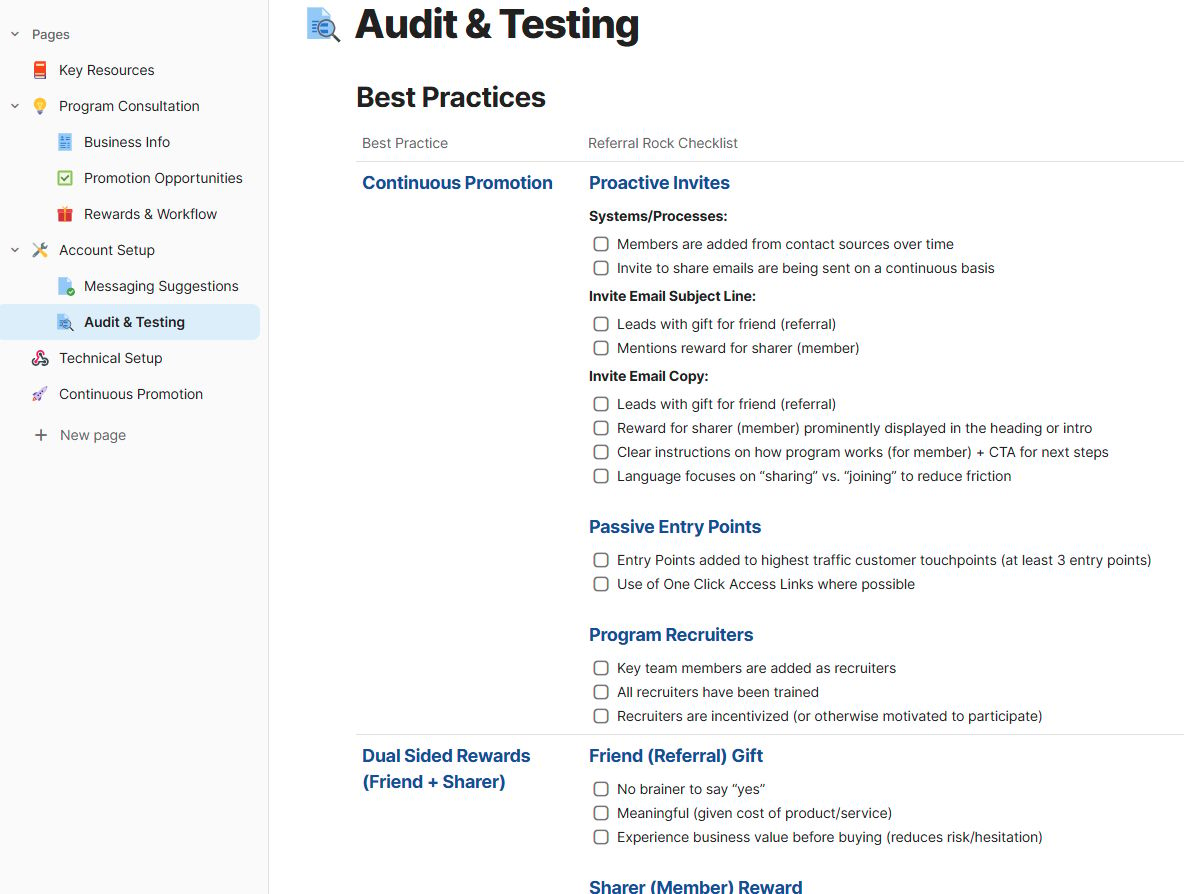
A preview of how we audit programs with the Shared Program Plan
Schedule a Program Audit if you want us to review your programs based on our shared program plan.
🌟 Product Updates - Manual Invites, Reminder Email Settings, and Member Addresses
This month’s updates are all about simplicity: faster manual invites, updated reminder email settings, and cleaner member address data.
Trigger invite emails instantly when adding members manually
You can now trigger an invite email immediately when you manually add a member (as an admin or recruiter). You no longer need to wait for the next scheduled email cycle.
More control and visibility into your reminder emails
The new Reminder Setup section lets you enable/disable reminders, see how many members were added in the last 7 days, and who is in line to receive a reminder.
Cleaner address data with dropdown fields (available on Member Portal)
Members can now select their country and state/province using dropdowns directly from their Member Portal. Fewer typos, cleaner data, and a smoother experience for everyone.
Migrating from custom fields? Reach out if you’re using custom fields for addresses and we’ll help you migrate to the new standardized fields without losing any data.
⏮ And in case you missed it…
Here are some more recent posts from our team if you need to catch up.